
Meet Shop Captain: The Workflow Engine Your Office Needs
- Shop Captain
- Jan 7
- 3 min read
"No logins, no passwords, no cloud subscriptions—just a fast, reliable queue that keeps your business moving"
Stop shouting across the office. Stop losing sticky notes. It’s time to modernize how your team handles tasks.
Whether you run a busy repair shop, a bustling real estate office, or a fast-paced dispatch center, communication breakdowns are the enemy of productivity. Enter Shop Captain, the lightweight, professional ticket management system designed to keep your team in sync without the bloat of expensive enterprise software.
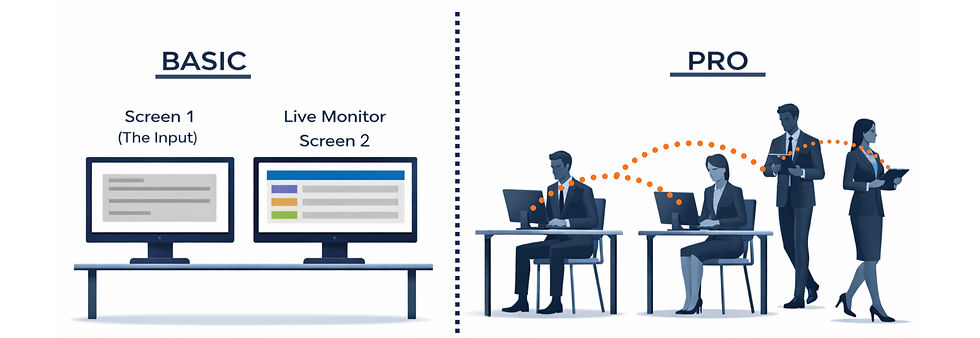
With the release of Version 2.0, Shop Captain now offers two distinct modes to fit your specific setup: Basic and Pro. Here is everything you need to know about which one is right for you.
1. The Basic Version (Single Station)
The "Command Center" Approach
The Basic version is designed for a single workstation that needs to manage a queue visually. Think of a front desk or a dispatch station.
How it Works: You run Shop Captain on one computer with two screens.
Screen 1 (The Input): You have the Request Form open on your main monitor to type in jobs as they come in.
Screen 2 (The Display): You drag the Live Monitor window to a second monitor facing the team.
Perfect For:
Small repair shops where one person takes orders.
Delis with a digital order screen.
Single-dispatcher offices.
2. The Pro Version (Networked Office)
The "Connected Team" Approach
The Pro version takes the power of Shop Captain and spreads it across your entire local network. This allows everyone to contribute from their own desks.
How it Works: One computer acts as the "Host" (Server), and everyone else connects to it via their web browser.
The Portal: When staff connect, they are greeted by a sleek Landing Page asking them to choose their role: "Submit Request" or "View Monitor."
Mobile Friendly: Staff can walk around with tablets or laptops and submit tickets from anywhere in the building.
Remote Ready: With a simple third-party add-on (like Tailscale), your team can access the system securely from the field—perfect for off-site technicians.
Perfect For:
Offices with multiple agents.
Warehouses with roaming staff.
Offices with separate departments (e.g., Sales sends tickets to Assembly).
Special Features
Shop Captain isn’t just a list; it’s a smart workflow tool. Here are the features that make it special:
💎 Custom Branding (Pro only)
Make it your own. Use the built‑in Config menu to enter your Company Name (for example, “Summit Group”). Once saved, it appears at the top of every screen, giving your interface a consistent, premium finish..
⚡ Seamless Refresh
Shop Captain uses "Smart Fetch" technology to silently update the queue in the background. New jobs slide into the list instantly without screen flicker, refresh delays, or interruptions to your workflow. .
🔔 Smart Audio Alerts
Never miss a new request. The Monitor page listens for new job IDs. If a new ticket arrives while you are looking away, a polite chime plays to alert the room.
⏸️ Hold & Resume Logic
Real life is messy. Sometimes you start a job but have to pause it to wait for paperwork, material or a client call.
Hold: Turns the ticket grey and moves it to a "Paused" state.
Resume: One click brings it back to "Pending" so it doesn't get forgotten.
🌗 Dark Mode
Easy on the eyes. A dedicated toggle switch lets you flip the entire interface between a
clean, bright "Day Mode" and a sleek, professional "Dark Mode."
Ready to Streamline?
Shop Captain is about removing friction. No logins, no passwords, no cloud subscriptions—just a fast, reliable queue that keeps your business moving.
Download Shop Captain v2.0 today and take control of your workflow.

Comments